What Is a PDF Parser? How to Extract Structured Data from PDFs
A PDF parser extracts text, fields, tables, and other useful information from PDF files, turning messy documents into structured data your team can review, export, and use in business workflows.
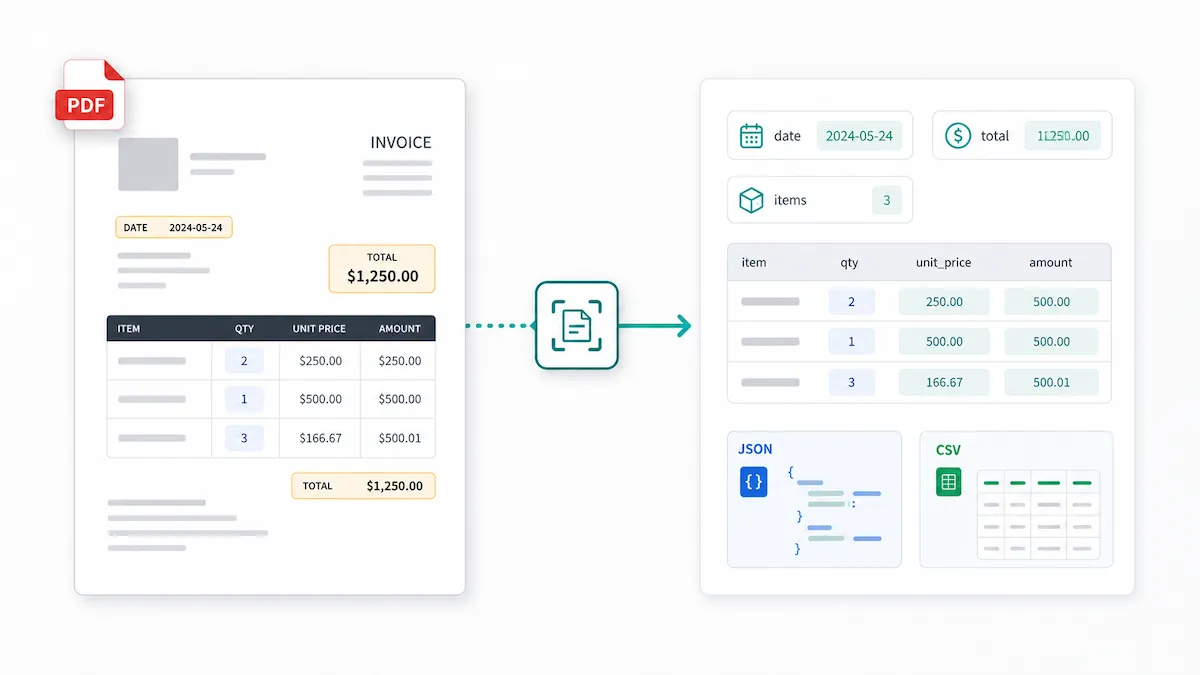
A PDF parser extracts specific data from PDF files and turns it into structured output, such as JSON, CSV, Excel spreadsheets, or database-ready records.
That may sound simple, but it solves a common workflow problem. Many teams receive invoices, receipts, bank statements, contracts, forms, or reports as PDFs. A person can read the document and understand the vendor name, invoice number, total, date, table rows, or contract terms. But when that data needs to move into a spreadsheet, database, or internal workflow, the PDF quickly becomes difficult to work with.
Copying and pasting often breaks the layout. Tables may turn into a messy block of text. Columns may merge. If the PDF is scanned, there may be no selectable text at all.
That is where PDF parsing helps. The goal is not just to read a PDF. The goal is to turn the information inside the PDF into data your team can actually use.
What is a PDF parser?
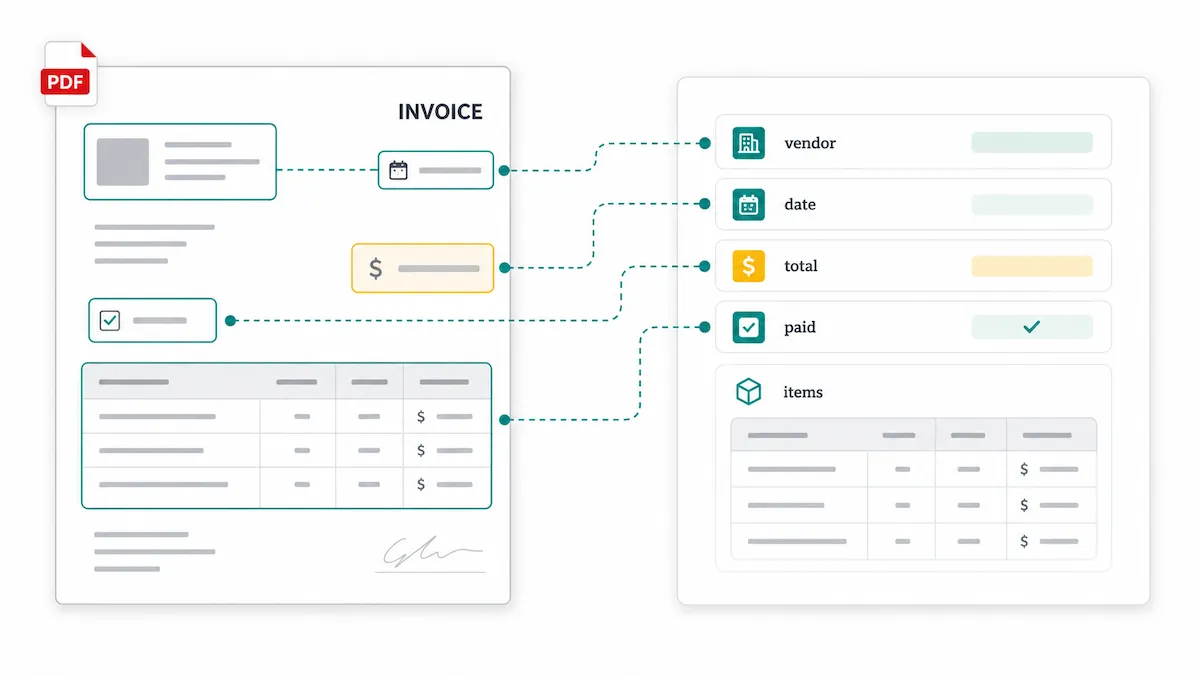
A PDF parser is a tool that extracts information from a PDF and organizes it into a usable structure.
Instead of giving you one long text dump, a useful parser can identify fields, tables, dates, amounts, IDs, checkboxes, and repeated rows.
For example, from an invoice, a PDF parser might extract:
Field | Example output |
|---|---|
vendor_name | Acme Supplies Ltd. |
invoice_number | INV-1048 |
invoice_date | 2026-05-12 |
subtotal | 850.00 |
tax | 68.00 |
total | 918.00 |
line_items | Item, quantity, unit price, amount |
The important point is this: a PDF parser should return the data your workflow expects, not just the text that appears on the page.
Common output formats include:
JSON
CSV
Excel-compatible tables
Structured field objects
Database records
Data for automation tools or internal systems
Why PDFs are hard to parse
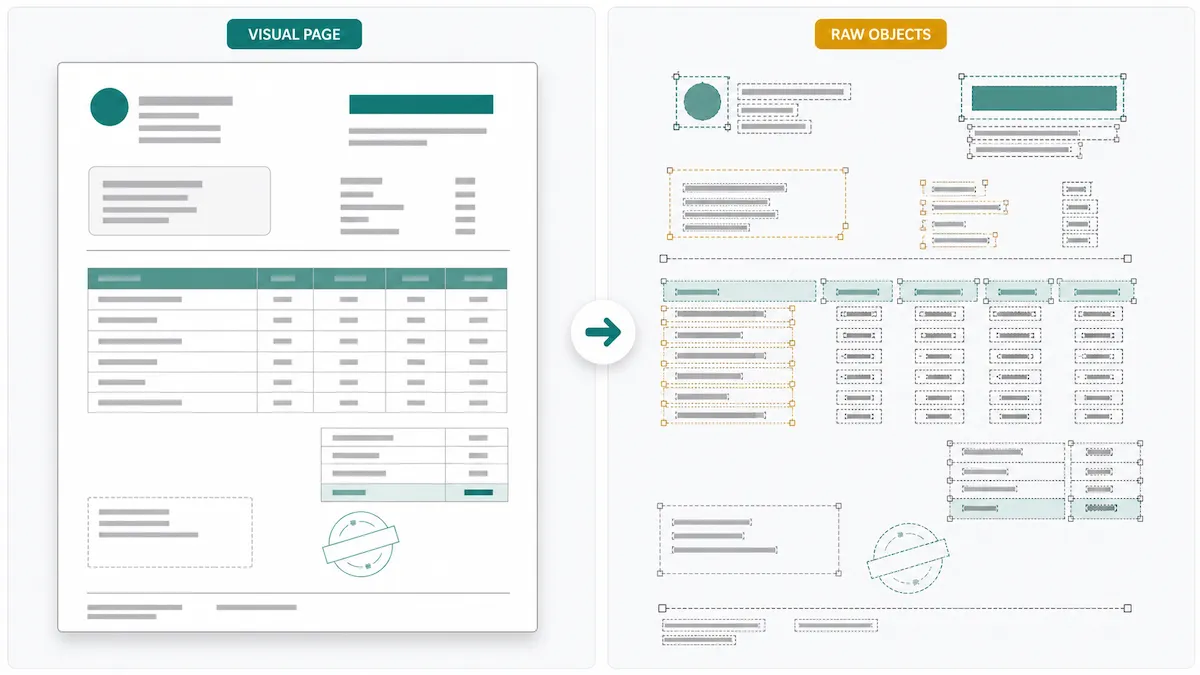
PDFs are great for preserving how a document looks. They are much less predictable as a source of structured data.
A PDF is designed to keep a page looking the same across devices and systems. It is not designed to behave like a spreadsheet, database, or form schema.
That creates several common problems:
Text may not be stored in the same order that humans read it.
Tables may be drawn with lines and positioned text instead of real rows and columns.
Scanned PDFs may only contain images, with no text layer.
The same field may appear in different places across vendors or templates.
Headers, footers, stamps, signatures, and notes can interrupt the main content.
Multi-column pages can confuse simple text extraction tools.
This is why a basic PDF-to-text converter often fails when you need reliable fields or tables. Getting the characters out of a PDF is only the first step. The harder part is understanding what those characters mean.
PDF parser vs OCR vs PDF converter
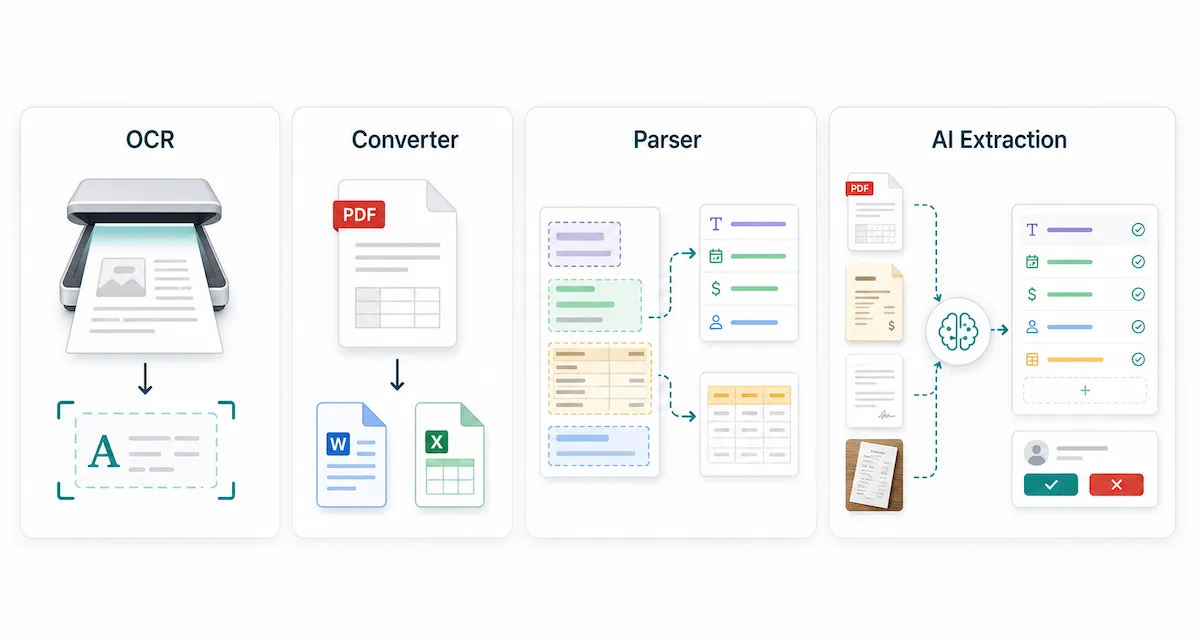
These terms are often used together, but they solve different problems.
Tool or method | What it does | Best for | Common limitation | Typical output |
|---|---|---|---|---|
OCR | Recognizes characters in scanned pages or images | Scanned PDFs, photos, image-only documents | Reads text but does not understand business fields | Text |
PDF converter | Converts a PDF into another format | Simple PDF-to-Word, PDF-to-text, or PDF-to-Excel tasks | Formatting and tables may break | Text, Word, Excel, images |
PDF parser | Extracts specific data from PDF content | Reusable fields, tables, forms, invoices, reports | Needs clear field definitions and may need review | JSON, CSV, spreadsheet rows, field objects |
AI data extraction tool | Uses AI and schema instructions to extract structured data from varied documents | Layout variation, custom fields, no-code or low-code workflows | Accuracy depends on document quality, schema clarity, and review | Structured fields, tables, JSON, workflow-ready data |
The shortest version: OCR reads characters. A PDF converter changes the file format. A PDF parser extracts useful data into fields and tables. An AI extraction tool can make parsing more flexible when layouts vary or when teams need custom schemas.
How PDF parsing works
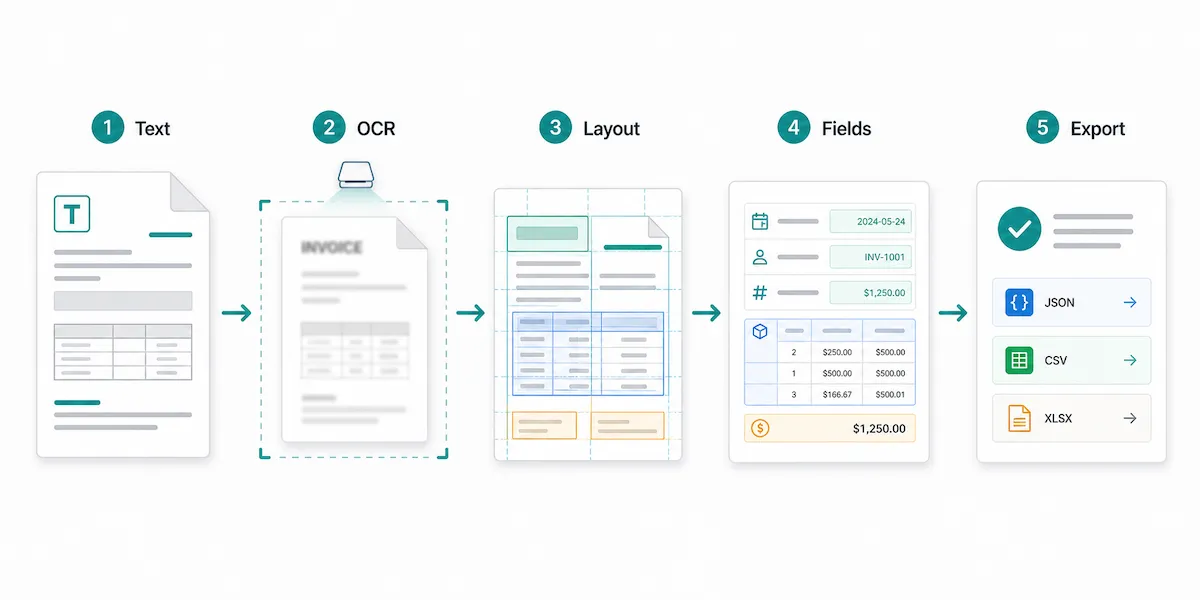
PDF parsing is usually a pipeline, not a single action. Different tools handle the process differently, but most serious parsing workflows include several layers.
1. Text extraction
Some PDFs already contain a text layer. These are often called digitally generated PDFs. For example, an invoice exported from accounting software may include selectable text.
At this stage, the parser reads the text objects inside the PDF. This works well for simple documents, but it does not always preserve meaning. The parser may get the words on the page without knowing which number is the invoice total, which text belongs to the address block, or which values are in the same table row.
2. OCR for scanned PDFs
OCR, or optical character recognition, converts visible characters in an image into machine-readable text. It is needed when a PDF is scanned, photographed, faxed, or image-based.
OCR is important, but OCR alone is not the same as parsing. OCR may tell you that the characters “Total $918.00” appear on the page. A parser still needs to decide whether that number is the total, subtotal, tax amount, balance due, previous payment, or a footnote.
3. Layout and table detection
Layout analysis tries to understand how the page is organized. It may look at sections, columns, tables, reading order, labels, proximity, and repeated patterns.
This layer matters because PDFs often store content by position. A page may look obvious to a person, but the file may not say, “This is a table” or “These values belong to one row.”
4. Field and table extraction
This is where parsing becomes useful for real workflows.
Instead of returning one long text block, the parser maps content into fields and tables. For an invoice, that might mean vendor_name, invoice_date, total_amount, and a line_items table. For a contract, it might mean parties, effective date, renewal term, and contract value.
Modern document AI tools often combine OCR, layout understanding, key-value extraction, table detection, and custom fields. This is the direction PDF parsing has moved: from reading text toward understanding document structure.
5. Validation and export
The final layer is making the result safe to use.
Parsed data may need review, required-field checks, number formatting, date normalization, or comparison against business rules. This is especially important for financial documents, contracts, customer records, and compliance workflows.
For example, a parser may extract a total amount correctly, but your workflow may still need to check that the subtotal plus tax matches the final total.
Common PDF parsing use cases
PDF parsers are most useful when documents repeat and the extracted data needs to go somewhere else.
Invoices and receipts
Teams parse invoices and receipts to extract vendor names, invoice numbers, dates, totals, tax, payment terms, and line items. The data can then be used for accounting, expense tracking, procurement, or reconciliation.
Bank statements and financial reports
Bank statements, financial statements, and audit reports often contain account details, transaction rows, balances, totals, and period-specific values. A parser can turn those values into spreadsheet-ready or database-ready data.
Forms and applications
Forms may contain names, addresses, submitted answers, selected checkboxes, signatures, and attachments. A parser can turn completed forms into consistent records instead of forcing someone to retype the information.
Contracts and agreements
Contracts are often long, but teams usually need a smaller set of important fields: parties, effective dates, renewal dates, termination terms, payment terms, contract value, governing law, or notice periods.
Custom internal documents
Many companies have document types that generic tools do not understand out of the box, such as inspection sheets, claim forms, shipping documents, lab reports, research papers, or internal reports. In these cases, custom fields matter more than a generic “extract all text” button.
Types of PDF parsers
There is no single best PDF parser for every situation. The right choice depends on your document quality, layout consistency, technical resources, and review needs.
Template-based parsers
Template-based parsers use rules, zones, coordinates, keywords, or fixed layouts. They can work well when every document follows the same format.
The downside is maintenance. If the layout changes, the rule may break. This can become frustrating when vendors use different templates or update their documents without warning.
Developer libraries and scripts
Developers can build PDF parsing workflows with libraries, OCR tools, and custom logic. This can be a good fit for stable templates or teams that want full control.
The harder part is handling real-world PDF variation: scans, rotated pages, tables, multi-column layouts, low-quality images, and exceptions. A simple script can become a larger maintenance project over time.
Cloud document AI APIs
Cloud APIs can provide OCR, layout analysis, form extraction, table extraction, and specialized document processors. They are useful for developer integration and large-scale workflows.
However, they usually still require engineering work, monitoring, error handling, and a product layer for non-technical users.
AI-powered extraction tools
AI-powered extraction tools are built for teams that need flexible structured extraction without maintaining a custom parser from scratch.
They are especially useful when layouts vary, fields are custom, or business users need to define and review outputs. The tradeoff is that AI extraction still needs clear schema design and human review for important workflows.
How to choose a PDF parser
When evaluating a PDF parser, start with the output you need.
Ask:
What fields do we need?
Do we need tables or repeated rows?
Do we need JSON, CSV, Excel, or database-ready records?
Are the PDFs scanned, digital, or mixed?
Do layouts vary across vendors or document types?
Does a person need to review the result before it is used?
A practical PDF parser should support:
OCR for scanned or image-based PDFs
Field extraction for names, dates, numbers, IDs, and custom values
Table extraction for line items or repeated rows
A way to define the schema you expect
Support for recurring document types
Review before downstream use
Export to formats that fit your workflow
Clear handling of privacy, retention, and sensitive documents
Reasonable error handling when fields are missing or uncertain
Accuracy is not a magic number. It depends on document quality, layout consistency, OCR quality, field definitions, and the review process.
When you may not need a PDF parser
A PDF parser is not always necessary.
You may not need one if:
You only need to read the PDF.
You only need to copy a small amount of text once.
The source data already exists as CSV, Excel, JSON, or an API.
The document is so low quality that even a human struggles to read it.
Your requirements demand a fully local, custom, audited system that a cloud tool cannot provide.
This boundary matters. If you only need plain text from one file, a simpler converter may be enough. If you need repeatable structured data from recurring documents, a parser becomes much more valuable.
A simpler way to parse recurring PDFs with Vellparser
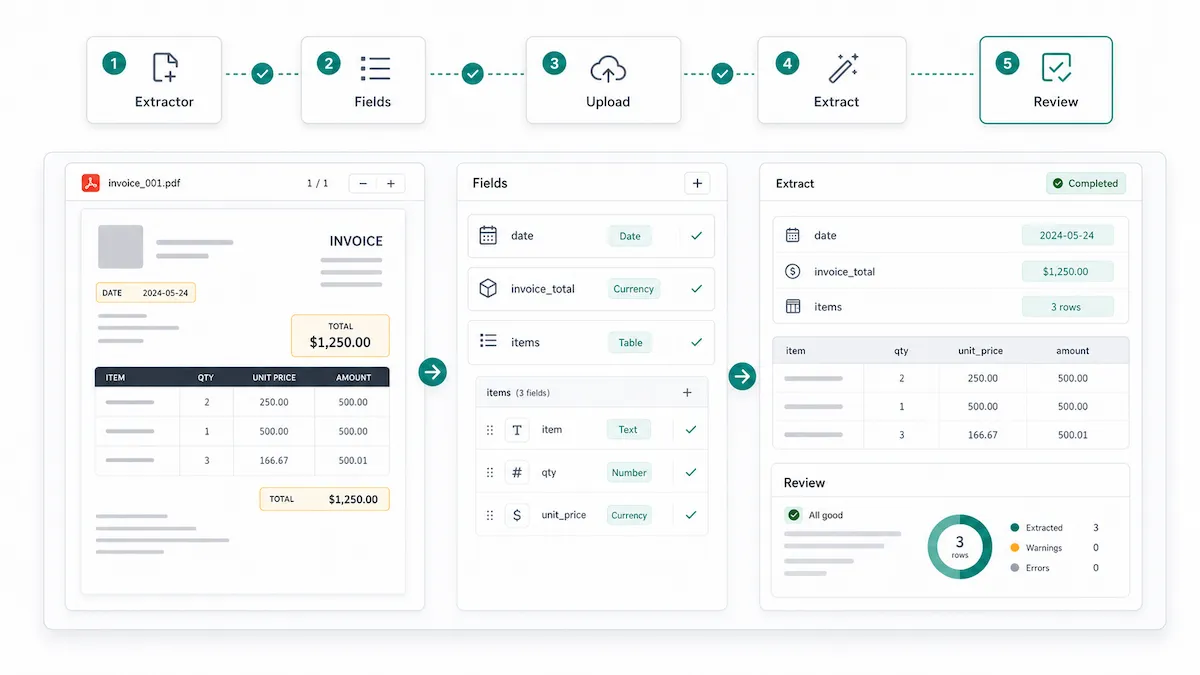
If your team handles recurring PDFs or business documents, Vellparser helps turn document parsing into a reusable structured extraction workflow.
Instead of treating every file as a one-off conversion task, you can create an Extractor for a recurring document type. An Extractor defines the output you want: fields such as names, dates, totals, IDs, booleans, and custom values, plus tables for repeated rows.
A typical Vellparser workflow looks like this:
Create an Extractor for a document type, such as invoices, contracts, reports, or research papers.
Define reusable fields using types such as String, Number, Boolean, and Table.
Upload supported documents, including PDF, DOCX, JPG, PNG, or WEBP files.
Let Vellparser extract the document into structured output.
Review the result before using it in your next workflow.
Vellparser is not a promise that every messy PDF will be perfect. Like any parser, results depend on file quality, layout complexity, and how clearly you define the output.
The benefit is that recurring document extraction becomes repeatable. Instead of rebuilding the same copy-paste process every time, your team can define the structure once and reuse it across similar documents.
FAQ about PDF parsers
Is a PDF parser the same as OCR?
No. OCR recognizes characters in scanned pages or images. A PDF parser extracts useful information from a PDF and maps it into fields, tables, or structured output. OCR may be one layer inside a parser, but it is not the full workflow.
Can a PDF parser extract tables?
Yes. Many PDF parsers can extract tables, but table extraction is one of the harder parts of PDF parsing. A table may be stored as positioned text and lines rather than real rows and columns, so the parser needs to detect both the table area and its structure.
Can I build a PDF parser with Python?
Yes. Developers can build parsers with Python libraries, OCR tools, and custom logic. This can work well for stable layouts. The harder part is handling layout changes, scanned pages, tables, exceptions, and review. If your team does not want to maintain that pipeline, a structured extraction tool may be easier.
What output formats can a PDF parser create?
Common outputs include plain text, JSON, CSV, Excel-compatible tables, database records, and structured field objects. The best format depends on where the data needs to go next.
Are AI PDF parsers always accurate?
No. AI can make parsing more flexible, especially when layouts vary, but accuracy still depends on document quality, OCR quality, schema clarity, and review. Sensitive workflows should include human checks before the data is used.
What is the difference between PDF parsing and document extraction?
PDF parsing usually refers to extracting data from PDF files. Document extraction is broader. It can include PDFs, images, Word documents, forms, receipts, emails, scans, and other business documents. In practice, many modern tools support both.
Conclusion
A PDF parser is useful when the real problem is not the PDF itself, but the data trapped inside it.
If you only need to read or copy a small amount of text, a simple converter may be enough. If you need recurring fields, tables, review, and structured output, look for a parser that supports OCR when needed, understands layout, lets you define a schema, and produces data your workflow can use.
For teams that need reusable structured extraction from PDFs and related documents, Vellparser lets you create an Extractor, define fields and tables, review the output, and turn documents into workflow-ready data.